
The Google Disavow Tool makes it possible to notify Google of poor-quality links pointing to your website that you don’t want associated with your site. Bearing in mind that a backlink profile can make or break a site, it makes sense that you may wish to remove any links that are not authoritative or relevant, or that have been added via non-best practice methods.
However, there is much talk throughout the SEO community that whilst the Google Disavow links Tool can be a valuable resource, its use has become somewhat controversial, and its value questionable.
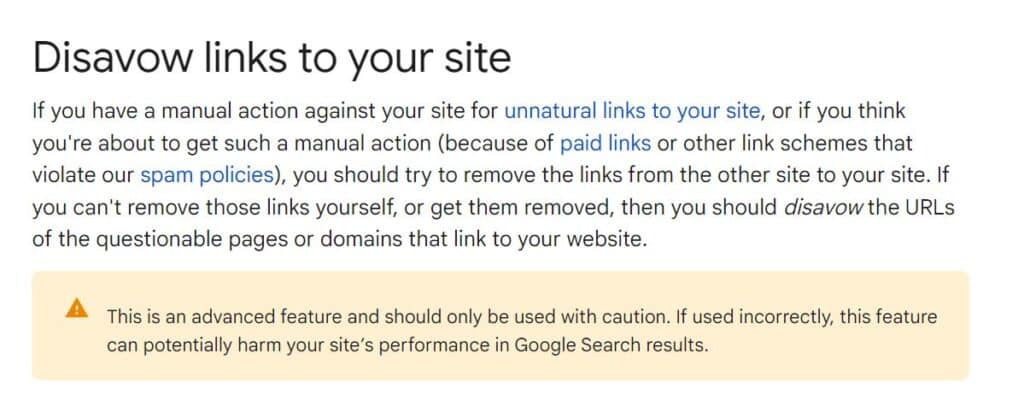
In fact, many SEO experts recommend using it only when there’s a clear and substantial risk posed by low-quality backlinks, especially if a site has received a manual penalty. Google itself suggests that Disavow is an advanced tool and not intended for casual use. They advise that used without care, it could do more harm than good.
Google Disavow has historically been considered a ‘magic wand’. Some people think it’s a solution to instantly fix search ranking problems. But that’s not the case. If a site is struggling with poor SEO performance, the issues often lie beyond their backlink profiles, such as in content quality, site structure, or user experience.
Therefore, for most websites, focusing on producing high quality content and building organic, quality backlinks can be a more effective strategy.
But let’s backtrack, because we still need to address the question of whether there’s still a case for the use of Google Disavow, and whether it actually DOES anything.
What is Google Disavow?
The Disavow links tool can only be accessed via a Google Search Console account. It allows you to import a text file containing your toxic links. Google then re-examines your backlink profile, and incorporates the disavows.
The tool was introduced in 2012 on the back of Google’s Penguin update. That was when the announcement came that using ‘black hat’ tactics to build backlinks would land a site with an instant Google penalty.
When you disavow a link, you remove it from your backlink profile. This means that any value you may have had from that link will be removed.
On one hand, it can be a good thing. Toxic links damage SEO. Sites can receive a penalty or manual action for breaching Google’s best practice guidelines. Disavowing bad links can help the site recover.
However, on the other hand, disavowing links could work against you, if for example you accidentally remove links that are in fact supporting your SEO.
And this is why the Disavow links tool should be used with a great deal of care.
Google Disavow: Why is its use declining?
It is safe to say there is some scepticism and debate around the effectiveness of the Disavow Tool. Which is what led us to pose the question, does the tool in Google Search Console actually do anything?
Google has become increasingly sophisticated in automatically ignoring low-quality links without any intervention. With every link spam update, the search engine gets better at working out which are and which aren’t spammy links. In fact it can automatically assess which links to trust without the site owner needing to take any action.
This means the necessity of using the Google Disavow has diminished for most sites, especially if they haven’t received a manual penalty.
For algorithm-related issues, Google will usually just ignore bad links so they won’t count towards the backlink profile, rather than issuing a penalty.
Google says that you should only disavow backlinks if:
- You have a significant number of spammy, artificial or low quality links pointing to your site, AND
- The links have led to a manual action, or are likely to cause one because you have paid for links or got involved in link swap schemes that violate Google’s quality guidelines
Add to this the fact that there’s talk of Google doing away with the Disavow links tool within Google Search Console in the future, and there’s another reason why its current relevance is under scrutiny.
Currently though, the tool remains, and Google hasn’t said outright NOT to use it. So we have to assume that yes, it does do something.
But this leads us to a more important question… in what situations is using Google Disavow the right thing to do, and when should it be avoided?
To disavow, or not to disavow?
There are pros and cons to using the Disavow links tool. And there are alternative solutions to removing bad links that are worth exploring.
The general consensus is that you should only use the Google Disavow tool if you have sufficient experience to evaluate a website and ascertain which of your backlinks are good, and which are not. If you are wrong about a link, you could damage your backlink profile by removing it.
You should also only use the tool in specific situations where there is a clear need to mitigate the impact of harmful backlinks.
Here are some example scenarios where it may be the right move to use Disavow:
1. Manual penalty from Google
If your site has received a manual action notice for unnatural links, using the Disavow links tool can be a necessary step in addressing the issue. This involves identifying and disavowing the problematic links to demonstrate a proactive effort in cleaning up your backlink profile.
2. Persistent negative SEO attacks
Where a site is targeted by negative SEO tactics, such as an influx of toxic or spammy backlinks, Disavow may help safeguard your site’s integrity. By disavowing these links, you can prevent potential penalties and protect your site’s rankings.
3. Difficulties in manual link removal
Sometimes, despite your best efforts, you may not be able to get webmasters to remove harmful links pointing to your site. In situations like these, disavowing these links can be an effective alternative to ensure they don’t negatively affect your site’s SEO.
What are the alternatives to disavowing links?
While Google Disavow can be a useful resource for dealing with harmful backlinks, it’s often beneficial to explore other alternatives before resorting to disavowing links.
These alternatives can help maintain a cleaner backlink profile and support a more robust SEO strategy.
Here are some effective methods:
1. Manual removal requests
One of the most direct and proactive ways to handle unwanted backlinks is to request their removal from the linking sites.
Here’s how you might approach this:
- Identify the problematic links: Use a backlink profile analysis tool (such as Ahrefs, Moz, or SEMrush) to identify the low-quality or potentially harmful backlinks.
- Locate contact information: Once identified, locate the contact information of the webmasters or administrators of these sites. This information can often be found on the website’s contact page, or in the WHOIS database.
- Draft a removal request email: Draft a polite and clear email requesting the removal of the link from your site. Be concise and professional, explaining why you are making the request.
- Follow-up: If you don’t receive a reply after a reasonable period of time, send a polite follow-up email.
2. Build a strong, natural backlink profile
Focusing on building a robust and natural backlink profile can reduce the impact of any negative links.
Here are some best practice back-linking strategies:
Create high-quality content: Consistently publishing valuable, informative, and engaging content naturally attracts high-quality backlinks.
You should be investing time or outside expertise in creating well-researched articles, comprehensive guides, infographics, and other shareable content types for best results.
Engage in ethical outreach: Reach out to reputable websites, journalists and bloggers within your industry niche. Your aim is to explore guest posting opportunities on relevant sites, or to secure coverage on high profile news sites. Your contributions will need to be of the highest quality and relevant to the audience in order to achieve credible backlinks.
Be sure to follow best practice when dealing with journalists. Our guide to Digital PR covers how to craft your approach, common mistakes to avoid, and tips on creating a compelling story for your digital PR campaign.
Tap into social media and online communities: Sharing your content on social media platforms and participating in relevant online communities can increase its visibility, encouraging natural backlinks from interested parties.
3. Regularly monitor your backlink profile
Keeping check on your backlink profile helps you quickly identify and address any unwanted or harmful links.
Here’s how to stay on top of it:
Set up alerts: Use tools such as Google Alerts or backlink monitoring services so that you’re notified when new links to your site are discovered.
Periodic reviews: Regularly audit your backlink profile to identify any sudden changes or suspicious links that could potentially harm your SEO.
4. Improve the internal quality of your website
From time to time, the impact of low-quality backlinks can be reduced by improving the overall quality of your own site.
A well-optimised, high-quality website is better placed to withstand the effects of a handful of negative backlinks.
By employing these proactive strategies, you not only reduce the need to use Google Disavow, but can also strengthen your site’s overall SEO health.

Can I rely on Google’s algorithms to ignore bad links to my site?
Google’s algorithms have become increasingly sophisticated in identifying and ignoring low-quality or spammy links without requiring manual intervention.
In many cases, it’s better to rely on these automated processes rather than using the Google Disavow Tool, especially under these circumstances:
1. No manual penalty or noticeable impact
If your site hasn’t received a manual penalty and there is no apparent negative impact on your rankings due to backlinks, it’s generally safe to trust Google’s algorithms to filter out low-quality links.
2. Natural link profile fluctuations
It’s normal for a website’s backlink profile to have a mix of high-quality and less desirable links, especially as your site grows. Google understands this and often disregards links that seem to be of low quality. Overuse of the Disavow Tool can unnecessarily complicate your SEO strategy.
3. Focus on positive SEO practices
Often, the best approach is to concentrate on building a strong, high-quality backlink profile through best practice SEO practices. By consistently generating valuable content and earning links naturally, you can bolster your site’s authority and trustworthiness, making it less vulnerable to any minor negative effects from low-quality backlinks.
Something to add here is that while Google does what it can to ignore spammy links, conducting a regular backlink review remains essential to make sure your backlink profile stays clean. This way, you’ll also be able to avoid any future penalties, together with any resulting negative impact on your search rankings.

Google Disavow FAQs
1. How often should I review my backlinks?
Answer: It’s recommended to regularly review your backlinks, depending on the size and activity level of your website. For smaller sites, a quarterly review may be sufficient. Larger, more active sites should consider monthly reviews. Reviewing at this frequency will allow you to quickly identify and address any harmful backlinks, ensuring your backlink profile remains healthy.
2. Can disavowing links improve my SEO?
Answer: Disavowing links can potentially improve your SEO, but it’s not a guaranteed method for boosting rankings. The primary purpose of the Google Disavow Tool is to prevent harmful links from negatively impacting your site, especially if you’ve received a manual penalty from Google.
While removing or disavowing toxic links can help you recover from penalties, the overall improvement in SEO will depend on multiple factors, including the quality of your remaining backlinks, your content, various technical factors, and how well optimised your website is.
3. What types of links should I disavow?
Answer: You should consider disavowing links that are clearly spammy, manipulative, or from low-quality sources.
These include links from:
- Link farms, or directories designed solely for SEO purposes
- Sites with a history of distributing malware or engaging in unethical practices
- Irrelevant sites that have no connection to your niche or industry
- Links that were built intentionally as part of a black hat SEO strategy
It’s vital to carefully assess each link, as disavowing legitimate, high-quality links can harm your SEO and negatively impact your rankings.
4. Are there any risks involved in using the Disavow Tool?
Answer: Yes, there are risks involved in using the Google Disavow Tool. The main risk is accidentally disavowing beneficial or neutral links, which could result in a loss of valuable link equity, harming your SEO performance in the process.
The tool should be used with great care, and primarily as a last resort when dealing with harmful links that cannot be removed manually.
5. Can I “re-avow” links after disavowing them?
Answer: Yes, it is possible to “re-avow” links by removing them from your disavow file and resubmitting it to Google Search Console. Once the updated file is processed, Google will start considering those links again in your backlink profile.
It’s important to be aware, however, that this process can be a drawn out one, and there’s no guarantee that the re-avowed links will restore any lost SEO value.
6. Do I need to use the Disavow Tool if I haven’t received a manual penalty?
Answer: In the majority of cases, if you haven’t received a manual penalty and there’s no clear evidence of negative SEO effects, it’s better to rely on Google’s algorithms to handle low-quality links.
Google’s systems are quite proficient at automatically disregarding spammy links. The Disavow links tool should be reserved for cases where harmful links are significantly impacting your site’s performance, or where there’s a risk of a manual penalty.
7. How do I know if my site has a manual penalty?
Answer: If a site has a manual action, part or all of that site won’t show up in the Google search results. You can check if your site has a manual action by logging into Google Search Console and checking the “Manual Actions” report.
If your site has received a penalty, you will see a notification detailing the issue, and instructions for resolving it.
8. What happens after I submit a disavow file?
Answer: After submitting a disavow file, Google will process it and update its evaluation of your site’s backlink profile. You can expect this process to take several weeks.
Once the process is complete, the disavowed links will no longer influence your site’s rankings. However, it’s important to bear in mind that the exact impact on your site’s SEO will depend on the quality and quantity of the remaining backlinks, and numerous other SEO factors.
Summing up… Does Google Disavow actually DO anything?
We feel we’ve proved that the Disavow links tool does do something, but that it’s only valuable in certain situations. In others, it could potentially do more harm than good.
Some SEO experts have even commented that submitting disavow files may actually be drawing attention to underhand link building practices, which could get you into even more hot water.
By no means is Google Disavow a substitute for a comprehensive, audience-focused and tailored SEO strategy that includes quality content and organic link building.
In summary, the Disavow Tool is a powerful but specialised SEO tool. It’s best used as a targeted response to specific threats or penalties, rather than as a routine measure.
For most sites, focusing on content quality and natural link-building, while trusting Google’s advanced algorithms to handle questionable links, will yield the best long-term results.
Figment is a London SEO agency with a proven track record of getting businesses found online and helping them grow sustainably through carefully planned, tailor-made, best practice strategies.
To discuss how we can help you make the right connections online, you are welcome to get in touch.